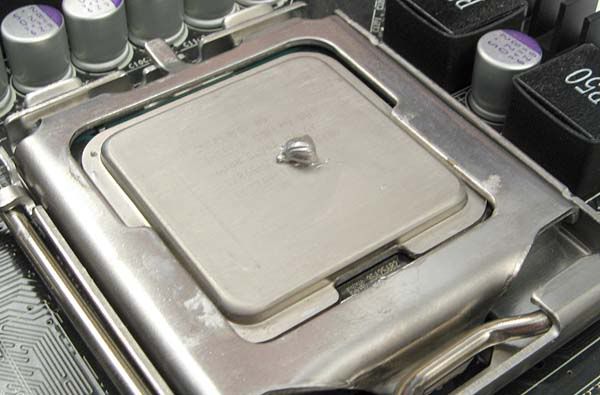
Broken CPU liquid cooler.
 Posted: Thu Jan 19, 2012 10:41 pm
So my heatsink or whatever it's called on a liquid cooling system (the thing that goes over the CPU) started making a fairly quiet ticking noise and I've been noticing that I've been getting terrible unplayable frame rates on swtor in populated areas and in non populated areas the fps is 40-50 fps lower than it should be, I checked my temps and two different programs said my cpu is idling at 75-80 degrees and goes up to like 100 if I start playing SWTOR, I'm a pretty big noob when it comes to computers but using logic and reading stuff online I'm pretty sure my cpu cooling system is broken... lol.
My computer is from ibuypower so the cooling system is no name brand as far as I know lol... I've ordered a new corsair one that should be here in a few days hopefully...
My questions are... Do I need to remove and put new thermal paste on the cpu when i install the new cooling system and if so what is the safest, best method of removing the thermal paste. Also is there a way to tell if I have done any damage to my chip? I've only ran swtor a few times for a few minutes each time until I figured out what the problem was and havent opened it up since.
My computer is from ibuypower so the cooling system is no name brand as far as I know lol... I've ordered a new corsair one that should be here in a few days hopefully...
My questions are... Do I need to remove and put new thermal paste on the cpu when i install the new cooling system and if so what is the safest, best method of removing the thermal paste. Also is there a way to tell if I have done any damage to my chip? I've only ran swtor a few times for a few minutes each time until I figured out what the problem was and havent opened it up since.