It is currently Wed Oct 21, 2026 12:07 am


msn messenger/yahoo messenger

All versions of Windows 7, 2008 and Vista including 32 bit and 64 bit

Moderator: icecube

msn messenger/yahoo messenger

Postby clennonuk » Sun Nov 07, 2004 2:25 pm

can anyone tell me how to stop msn/yahoo messenger signing automatically on start up
cheers clennonuk :wink:
User avatar
clennonuk
Senior Geek
Senior Geek
 
Posts: 158
Joined: Thu Feb 12, 2004 1:00 am
Location: London England

Thanks given:0
Thanks received:0
Top

Postby lilpinkflower » Sun Nov 07, 2004 2:50 pm

For MSN messenger.....

tools>options>general

then uncheck the boxes for sign-in... at the top.

I haven't got Yahoo installed at the mo.... it will be something similar though

:)

lilpink x
System specs:

Clovebud No.7, Max Factor Hypersmooth, L'Oreal Lash Architect, The Body Shop Poudre Libre, 17 Nude blusher and hair by Uppercutz.


Image
User avatar
lilpinkflower
Moderator
Moderator
 
Posts: 1603
Joined: Wed Apr 07, 2004 1:00 am
Location: manchester, U.K

Thanks given:0
Thanks received:0
Top

Postby Cactus » Sun Nov 07, 2004 3:17 pm

You can also REMOVE apps from starting up at boot-up by removing them from the START-UP folder.
When in the Folder,right click an ICON you want to remove from the Startup folder and click DELETE.

On WinXP the Startup Folder is located here:

C:\Documents and Settings\USER\Start Menu\Programs\Startup


Cactus
User avatar
Cactus
Geek Alumni
 
Posts: 1330
Joined: Sat Nov 30, 2002 1:00 am
Location: Somewhere...

Thanks given:0
Thanks received:0
Top

Postby lilpinkflower » Sun Nov 07, 2004 3:41 pm

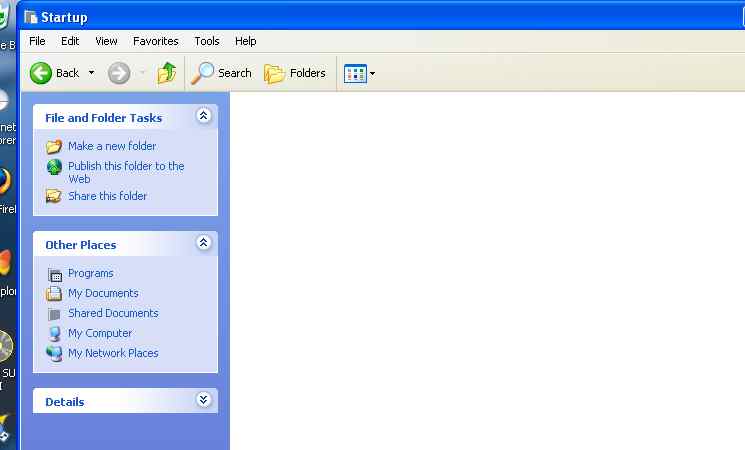
i just looked at mine.... n I have NO programs in my Startup folder :| .. so then i looked in 'Jane' rather than 'All users' and there's none in there either

*plays twilight zone music*

... there is however lots of programs all around the start up folder... hmmmm are those the ones to delete ? :wobble:

hehehe

lilpink x
System specs:

Clovebud No.7, Max Factor Hypersmooth, L'Oreal Lash Architect, The Body Shop Poudre Libre, 17 Nude blusher and hair by Uppercutz.


Image
User avatar
lilpinkflower
Moderator
Moderator
 
Posts: 1603
Joined: Wed Apr 07, 2004 1:00 am
Location: manchester, U.K

Thanks given:0
Thanks received:0
Top

Postby Cactus » Sun Nov 07, 2004 3:55 pm

If your running WinXP your STARTUP FOLDER is located here...

START>Documents and Settings\USER\Start Menu\Programs\Startup

USER being your name...

Anything that STARTS up should be in the FOLDER... not around it.
FYI...this only prevents it from Starting up at BOOT.
It does not DISABLE the program.

Cactus
User avatar
Cactus
Geek Alumni
 
Posts: 1330
Joined: Sat Nov 30, 2002 1:00 am
Location: Somewhere...

Thanks given:0
Thanks received:0
Top

Postby lilpinkflower » Sun Nov 07, 2004 3:58 pm

mine are around it.... should I be worried ? :shock:

hehehehe

lilpink x
System specs:

Clovebud No.7, Max Factor Hypersmooth, L'Oreal Lash Architect, The Body Shop Poudre Libre, 17 Nude blusher and hair by Uppercutz.


Image
User avatar
lilpinkflower
Moderator
Moderator
 
Posts: 1603
Joined: Wed Apr 07, 2004 1:00 am
Location: manchester, U.K

Thanks given:0
Thanks received:0
Top

Postby Cactus » Sun Nov 07, 2004 4:02 pm

Hmm...so they reside where? In the Program Folder?
These are APPS that run at STARTUP....is that right?

Cactus
User avatar
Cactus
Geek Alumni
 
Posts: 1330
Joined: Sat Nov 30, 2002 1:00 am
Location: Somewhere...

Thanks given:0
Thanks received:0
Top

Postby lilpinkflower » Sun Nov 07, 2004 4:18 pm
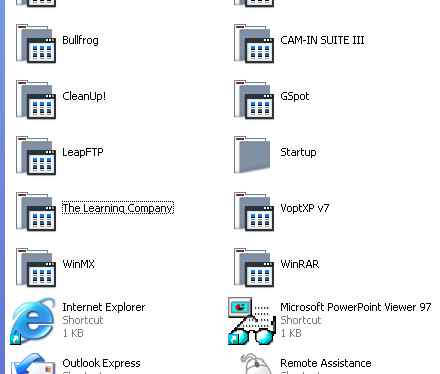
Hmmmm no they are not the programs that run at startup

Heres a shot of them around my startup folder

Image


.... apparently I have NO programs to run at startup lolz


Here's inside my folder :(

Image

lilpink x
System specs:

Clovebud No.7, Max Factor Hypersmooth, L'Oreal Lash Architect, The Body Shop Poudre Libre, 17 Nude blusher and hair by Uppercutz.


Image
User avatar
lilpinkflower
Moderator
Moderator
 
Posts: 1603
Joined: Wed Apr 07, 2004 1:00 am
Location: manchester, U.K

Thanks given:0
Thanks received:0
Top

Postby Cactus » Sun Nov 07, 2004 4:29 pm

Not everything gets placed in the windows startup folder, its use is slightly inefficient.

MSN Messenger is an example, you define whether it starts at startup within the program itself, via a checkbox. It wont appear in the windows startup folder though.

Checking tools->options in most programs usually provides you with some sort of "turn on and off" functionality for starting automatically or not.


Cactus
User avatar
Cactus
Geek Alumni
 
Posts: 1330
Joined: Sat Nov 30, 2002 1:00 am
Location: Somewhere...

Thanks given:0
Thanks received:0
Top

Postby lilpinkflower » Sun Nov 07, 2004 4:32 pm

Well mine is very inefficient lol

:lol:

Oh well.... i shouldn't be worried then ? Everything works fine :mrgreen:


lilpink x
System specs:

Clovebud No.7, Max Factor Hypersmooth, L'Oreal Lash Architect, The Body Shop Poudre Libre, 17 Nude blusher and hair by Uppercutz.


Image
User avatar
lilpinkflower
Moderator
Moderator
 
Posts: 1603
Joined: Wed Apr 07, 2004 1:00 am
Location: manchester, U.K

Thanks given:0
Thanks received:0
Top

Postby Cactus » Sun Nov 07, 2004 4:34 pm

Yup...when you start having problems then worry...not before... :wink:

Cactus
User avatar
Cactus
Geek Alumni
 
Posts: 1330
Joined: Sat Nov 30, 2002 1:00 am
Location: Somewhere...

Thanks given:0
Thanks received:0
Top


Return to Windows 7, 2008 and Vista

Who is online

Users browsing this forum: No registered users and 1 guest

cron